

Made for speech and language therapists

Software for speech therapy centres: AI scheduling and management

Diary, patients, treatment goals, session vouchers, consent forms and payments in one program. You focus on helping your patients communicate better; ZeeClip takes care of the rest.

  • Data migration included
  • Support in English
  • GDPR compliant
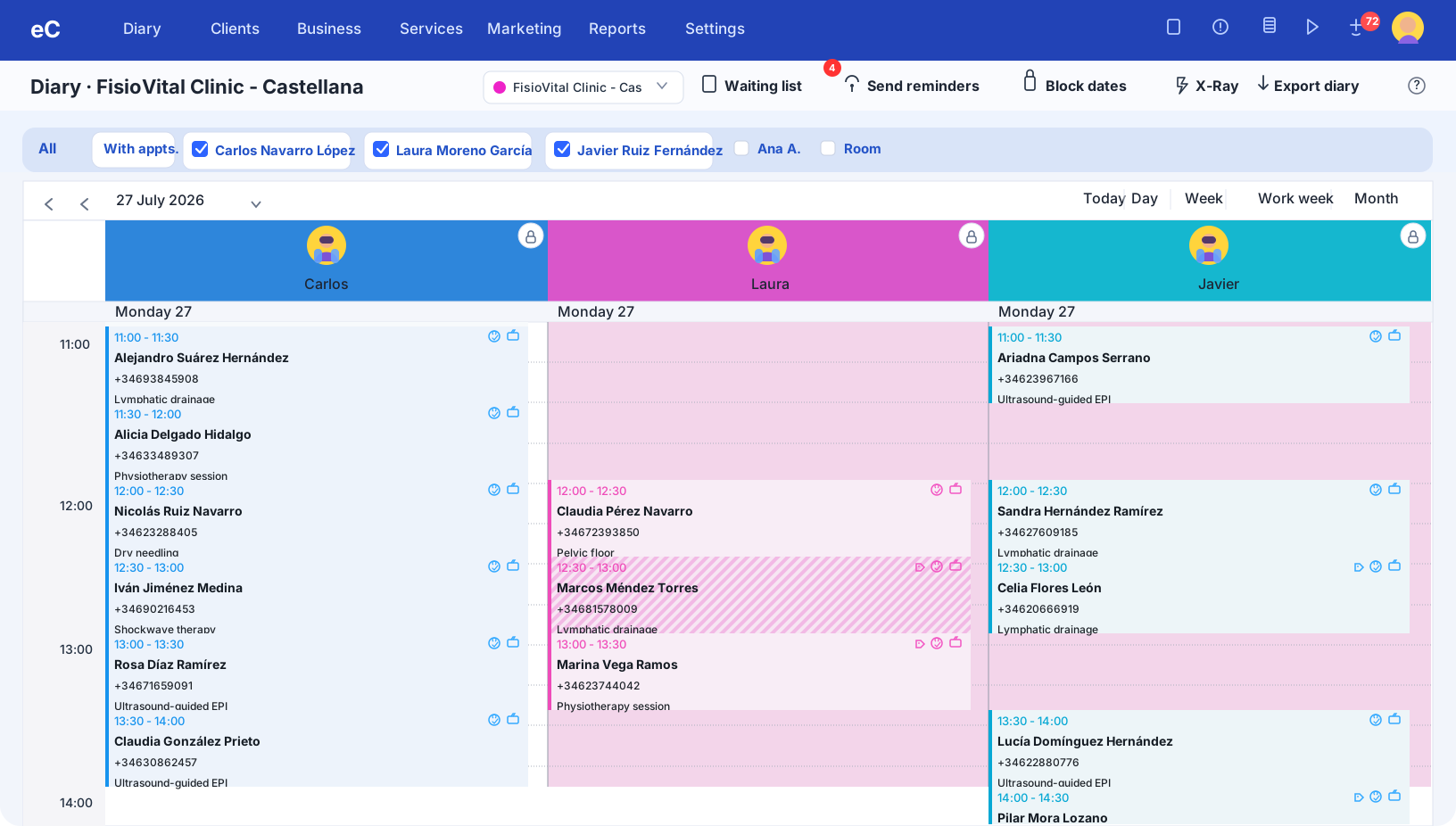
ZeeClip diary showing the day's appointments for three professionals
Speech and language therapist smiling in her speech therapy centre

Why choose ZeeClip

  • Quick Setup

    Start working in minutes with our intuitive, guided setup

    • Guided setup
    • Data migration included
    • English-language support
  • 100% Secure

    Your data is protected with us

    • GDPR compliance
    • Automatic backups
    • Cloud platform
  • Artificial Intelligence

    Optimise your business with AI-powered insights and automations

    • Virtual receptionist
    • AI-powered reports
    • Automations

Sound familiar?

ZeeClip is for you if...

Your diary has gaps and constant changes

Between children's and adults' sessions, rooms, school timetables and families who cancel at the last minute, sorting out the diary eats up your day. An unfilled gap is a lost session.

See how the calendar solves it

Each patient's progress is scattered

Goals in a notebook, vouchers in an Excel sheet, authorisations on paper and messages with families on your personal WhatsApp. Following each patient's progress takes more effort than it should.

See how the CRM solves it

You spend more time on admin than in sessions

Confirming appointments, answering the same messages, preparing authorisations and invoicing are necessary tasks, but they aren't speech therapy. They're hours you take away from your patients.

See how AI automates it

All the modules

Everything your centre needs, designed for a speech therapist

These are ZeeClip's modules, explained through what you do every day: sessions, rooms, families, vouchers, authorisations and each patient's progress.

Smart diary

A diary that understands how a speech therapist works

Sessions of 30, 45, 60 minutes or whatever length you set for each service, with several therapists and rooms. ZeeClip cross-checks everything so nothing overlaps and you don't end up with dead gaps between one patient and the next.

A day in your centre

Lucas's mother cancels the 5:30pm session. The waiting list already has another family who wanted an earlier appointment: the slot isn't lost.

See the full feature
  • One column per therapist

    See at a glance who has a free slot today and this week, with one colour per service.

  • Rooms and resources under control

    A room or the group room can't be booked twice at the same time.

  • Recurring appointments

    Schedule the weekly session of a treatment that lasts months in one go.

  • Waiting list

    When a family cancels, you have someone to offer the slot to instead of losing the session.

Online booking 24/7

Your patients book themselves, you stay in session

Your centre takes bookings at night and at weekends too. Patients or their families choose the centre, therapist and service, and only see the slots that are genuinely free.

A day in your centre

On a Sunday night, a mother decides to ask for an assessment for her son. She books for Monday without waiting for you to open.

See the full feature
  • Choose practitioner and service

    Each family books with their usual therapist or with whoever has the earliest slot.

  • Free slots only

    Bookings sync with your diary: no double bookings and no confirmation calls.

  • From your website and social media

    Link the booking assistant wherever your patients already find you.

  • In your own style

    Customise colours, confirmation messages and how far in advance people can book.

Virtual reception

Answers for you while you're in a session

You can't pick up the phone while a child is working with you. The virtual receptionist handles WhatsApp, calls and social media, answers questions and books appointments for you, at any hour.

A day in your centre

It's 9:40pm and a mother asks if she can move her son's Thursday session. The virtual receptionist handles it and the diary updates itself.

See the full feature
  • 24/7 service

    Replies on WhatsApp, by phone and on social media, including outside your opening hours.

  • Books and manages appointments

    Adds sessions to the diary without errors and handles changes and cancellations.

  • Answers common questions

    Opening hours, prices, availability, how to get there or what to bring to the first session.

  • Less admin load

    Your team focuses on the patient in front of them.

Communication with patients and families

WhatsApp, SMS and email from one place

Reminders, home exercises and campaigns with your patients and their families, without switching between apps or using your personal mobile.

A day in your centre

After an articulation session, the family receives the exercises to practise that week on WhatsApp, without you having to type them out.

See the full feature
  • Automatic reminders

    Fewer no-shows because every patient or family gets a notice of the next session.

  • Exercises after the session

    Send the guidance and exercises to practise at home, so the work doesn't stop between sessions.

  • Targeted campaigns

    Write only to those who are interested: inactive patients, a new workshop or a voucher promotion.

  • Unified history

    All communication with the family is recorded in a single place.

Consent and authorisations

From paper to signature on a tablet

Legal guardian authorisation for minors, data protection and the documents you use in your centre. Create them once, and have the family sign on a mobile or tablet before starting.

A day in your centre

A family arrives for the first assessment. The mother signs the authorisation and the data protection form in the waiting room, and both are saved in her son's record.

See the full feature
  • One document per service

    Write your own, including the guardian authorisation, and reuse it with every patient.

  • Details that fill in themselves

    Name, ID number and other details are filled in automatically in the document.

  • Digital signature

    Sign from a mobile or tablet, with no printing or scanning.

  • Version control

    Always use the current version and keep each signature in the patient's record.

Patient record and goals

Every patient, all their progress

Patient details, sessions, notes, vouchers and documents in a single record. You know where each goal stands without searching three places.

A day in your centre

Before the session you open Lucas's record: you see how his goals are going, what you noted at the last session and how many he has left on his voucher.

See the full feature
  • One record, everything inside

    Contact and family details, appointments, payments and documents for each patient, always to hand.

  • Goals and notes per session

    Note the progress on each goal and what you worked on to keep the treatment moving.

  • Tags and segments

    Classify by type of treatment, age or profile so you can find them and message them when it's time.

  • Reactivation and reviews

    Get in touch with those who stopped coming and ask for Google reviews after each visit.

Patient app

Your centre on the mobile of every family

Your patients and their families manage appointments from their phone: they book, check the history, download invoices and sign documents without calling you.

A day in your centre

A mother needs the invoice for her son's sessions. She downloads it herself from the app, without messaging you or waiting for you to send it.

See the full feature
  • Book by centre, practitioner and service

    They see the free slots and pick the one that best fits school and family life.

  • Appointment history

    See past and upcoming sessions in one place.

  • Payments and invoices

    Check what has been paid and download invoices whenever needed.

  • Documents and consent forms

    They sign whatever you ask for right in the app.

POS and session vouchers

Vouchers and payments without spreadsheets

Set up your services with length, colour and price, sell session vouchers and take payment on the spot. Each session is deducted from the voucher without keeping count by hand.

A day in your centre

Hugo's family buys a 10-session voucher. At each visit ZeeClip deducts one and you always know how many he has left.

See the full feature
  • Service catalogue

    Length, colour, price and VAT for each service: initial assessment, articulation, language, literacy and everything else you offer.

  • Session vouchers

    Sell packages and redeem each appointment against the patient's voucher.

  • Instant payment

    Record payment for the session or voucher right at the centre.

  • Purchases, expenses and products

    Keep track of what you buy for the centre and the materials you sell, not just what comes in.

Smart invoicing

Invoices and quotes without losing time

Generate invoices straight from the appointment, quote for multi-session treatments and comply with Verifactu and TicketBAI without having to think about it.

A day in your centre

A family accepts a 12-session programme. You give them the quote, and every payment is recorded and invoiced.

See the full feature
  • Verifactu and TicketBAI

    Built-in e-invoicing so your centre always stays up to date with the regulations.

  • Invoice from the appointment

    Go from the completed session to the invoice in a couple of clicks.

  • Treatment quotes

    Present a programme of sessions with its price before you start.

  • Payments under control

    Tell paid from pending and cancelled at a glance, with income in real time.

AI reports

Know which services fill your centre

Occupancy, income and how consistently your patients attend, in one clear dashboard. You decide hours, prices and rooms with data, not gut feeling.

A day in your centre

Monday's summary warns you that Monday afternoons are running short of bookings. You decide to launch a voucher campaign for that slot.

See the full feature
  • Diary occupancy

    See which time slots fill up and which stay empty, by practitioner.

  • Profitability by service

    Identify which services bring the most income to the centre.

  • Your most consistent patients

    Check session frequency, months of treatment and the status of each patient.

  • AI weekly summary

    Get the key metrics by email, compared with the previous week.

Multi-centre and team

One centre or five, one point of control

Manage several sites and your whole team from one account. Each therapist sees what they need; you see everything.

A day in your centre

You open a second centre in another neighbourhood. You add the site and its team, and you work with the same diary and the same reports.

See the full feature
  • All your sites in one account

    Switch centres without logging out and compare how each one is doing.

  • Permissions per user

    Decide what each therapist or receptionist can see and do.

  • Synced diaries

    Changes show instantly across centres and practitioners.

  • Ready to grow

    Open a new site without changing software or the way you work.

The result

ZeeClip transforms your centre

A platform designed for speech therapy centres, with AI to take admin off your plate and give you time for your patients.

Request a DEMO →
  1. Personalised follow-up

    Each patient's goals, notes and next appointment always in view.

  2. Free yourself from admin

    Reminders, bookings, authorisations and invoices almost take care of themselves.

  3. Everything on one platform

    Diary, patients, communication, payments and reports without jumping between tools.

  4. Adapts to your centre

    One or several therapists, different services, vouchers and sites: you decide how to work.

Common questions

Frequently asked questions about speech therapy software

Does ZeeClip support digital signatures for informed consent?

Yes, ZeeClip makes digital signing of informed consent forms easy, such as the legal guardian's authorisation for minors. Your patients can sign securely and conveniently from a mobile or tablet, ensuring the legal validity of these consents, and the document is saved in their record.

Does ZeeClip help me comply with data protection regulations?

Yes, ZeeClip is designed to help you comply with data protection regulations. The platform handles your patients' information securely, ensuring all data is processed in accordance with current data protection laws.

Is ZeeClip a cross-platform, multi-device solution?

Yes, ZeeClip is a cross-platform, multi-device solution. You can access it from any device, whether a computer, tablet or mobile phone, and it works on different operating systems such as Windows and macOS. This gives you the flexibility to manage your speech therapy centre from anywhere, at any time.

Does ZeeClip have an online booking system so patients can book on their own?

Yes, ZeeClip includes an online booking system that lets your patients book their own appointment, choosing the therapist, type of session and time. You can also create as many virtual assistants as you like to link from different channels, avoiding queues and lost appointments.

How can ZeeClip help improve the efficiency of my speech therapy centre?

ZeeClip automates and simplifies appointment management, freeing up time so you can concentrate on supporting your patients and their families. It also lets you customise sessions, services and each practitioner's diary, which improves the organisation of your speech therapy centre and your patients' satisfaction.

Can ZeeClip help me reduce patient cancellations and no-shows?

Yes, ZeeClip sends appointment reminders by email, SMS and WhatsApp, which helps reduce cancellations and no-shows. Your patients can also easily rebook their appointments, and the waiting list helps you fill last-minute gaps.

Can I customise sessions and services in ZeeClip to suit my speech therapy centre's needs?

Absolutely. ZeeClip allows full customisation of sessions and services: the length and type of each session. That way you adapt the software to the specific needs of your speech therapy centre.

Can I manage child patients and their families?

Yes. You can save the family's contact details in the record, send reminders to that contact and collect consent forms signed by the legal guardian from a mobile or tablet.

How can ZeeClip help improve communication with my patients?

ZeeClip offers multiple communication channels, including WhatsApp, email and SMS, making it easier to interact with your patients. It also lets you send appointment reminders, reminders aimed at families and promotional messages efficiently.

Is ZeeClip easy for my team to use?

Yes, we designed ZeeClip with ease of use in mind. Its intuitive, friendly interface makes it easy for your team of therapists and reception staff to find their way around. We also offer support and training to ensure a smooth transition to our system.

How does ZeeClip work as cloud software, and what are its advantages for my speech therapy centre?

ZeeClip is SaaS (Software as a Service) software, which means it is hosted in the cloud and can be accessed from any device with an internet connection. This offers a number of advantages, such as being able to manage your speech therapy centre from anywhere, no need for hardware maintenance and the assurance that your data is secure and backed up in the cloud.

I have a patient database. Can I import it into ZeeClip?

Yes, absolutely. We understand that data migration can be a big challenge when switching to a new management system. That is why ZeeClip lets you import your patient database, ensuring a smooth transition with no interruption to your service. Our technical support team will be on hand to help you at every step of the process.

Getting started

Everything you need to get started

Complete documentation, tutorials and resources to get your online appointment management software up and running and make the most of every feature.

Data import included

Free migration of your existing data from any previous system. No loss of information.

Request migration

Webinars and training

Live and recorded sessions to master every feature of your online appointment calendar.

Watch webinars

24/7 support

Technical assistance available around the clock to answer questions and keep your appointment management system running smoothly.

Contact support

Next step

Ready to transform your business?

Join dozens of businesses that already trust ZeeClip to manage their appointments and optimise their business.

  • Lightning-fast setup
  • Support in English